|
It is very easy to
install PC Optimizer Pro on your computer. PC Optimizer Pro is
packaged to provide you with step-by-step instructions on how to
safely install or uninstall it on your computer.
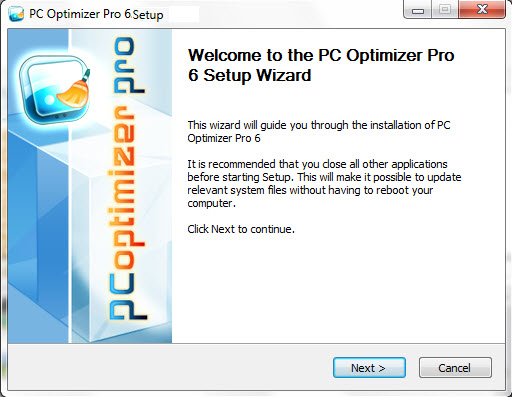
 To Install PC Optimizer Pro To Install PC Optimizer Pro
In the initial welcome screen that appears,
click the "NEXT" button.
In the next screen, you need to read
the End-User
License Agreement. If you
agree with the terms and conditions, choose the "I ACCEPT
THE AGREEMENT" option. Please note that you must accept
the agreement to continue.
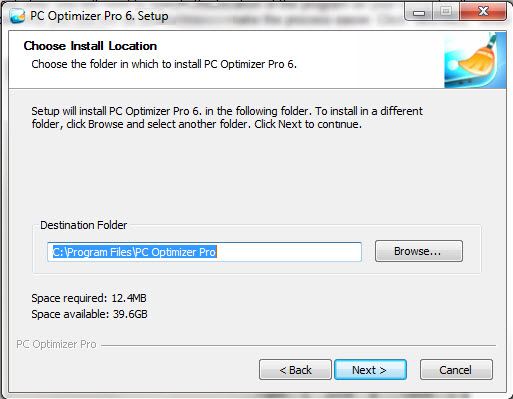
In the next step, you will need to specify
the location of the program on your computer. It is recommended
that you use the default location to make the process easier. Click
"INSTALL" when ready.
Congratulations! You
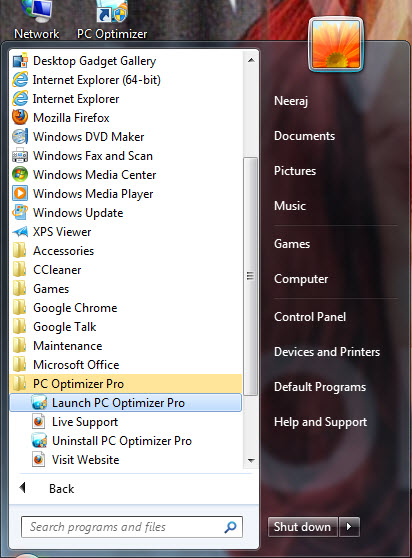
have now installed PC Optimizer Pro on your computer. To launch PC
Optimizer Pro, click its shortcut on your desktop or launch it from
the Start Menu by the following procedure:
Click "START" on the
taskbar.
Navigate to the "PC OPTIMIZER
PRO" folder
Click "LAUNCH PC OPTIMIZER PRO"
and the program launches.
The labor for
installation is often one of the most overlooked costs associated
with the installation of software. At PC Optimizer Pro, we are
committed to a quality product and installation.

|